
Call log reporting that shows which calls made money
Your phone system already keeps a log of every call. Morning Tally turns that log into a daily report showing calls by rep, the missed calls nobody returned, and which calls turned into orders.
Samples and orders open January 2027.
What’s in a call log
Every business phone system keeps one. Each row is a call: the time, the number, the direction, which person or line took it, how long it lasted and how it ended. Some systems add a recording, a transcript or a disposition the rep picked after hanging up.
The call log reports built into most phone systems stop at counts, like calls per rep, average talk time and answer rate. Those numbers tell you how busy the phones were. They can’t tell you whether the calls made any money, because the phone system can’t see your orders.
What Morning Tally adds to the log
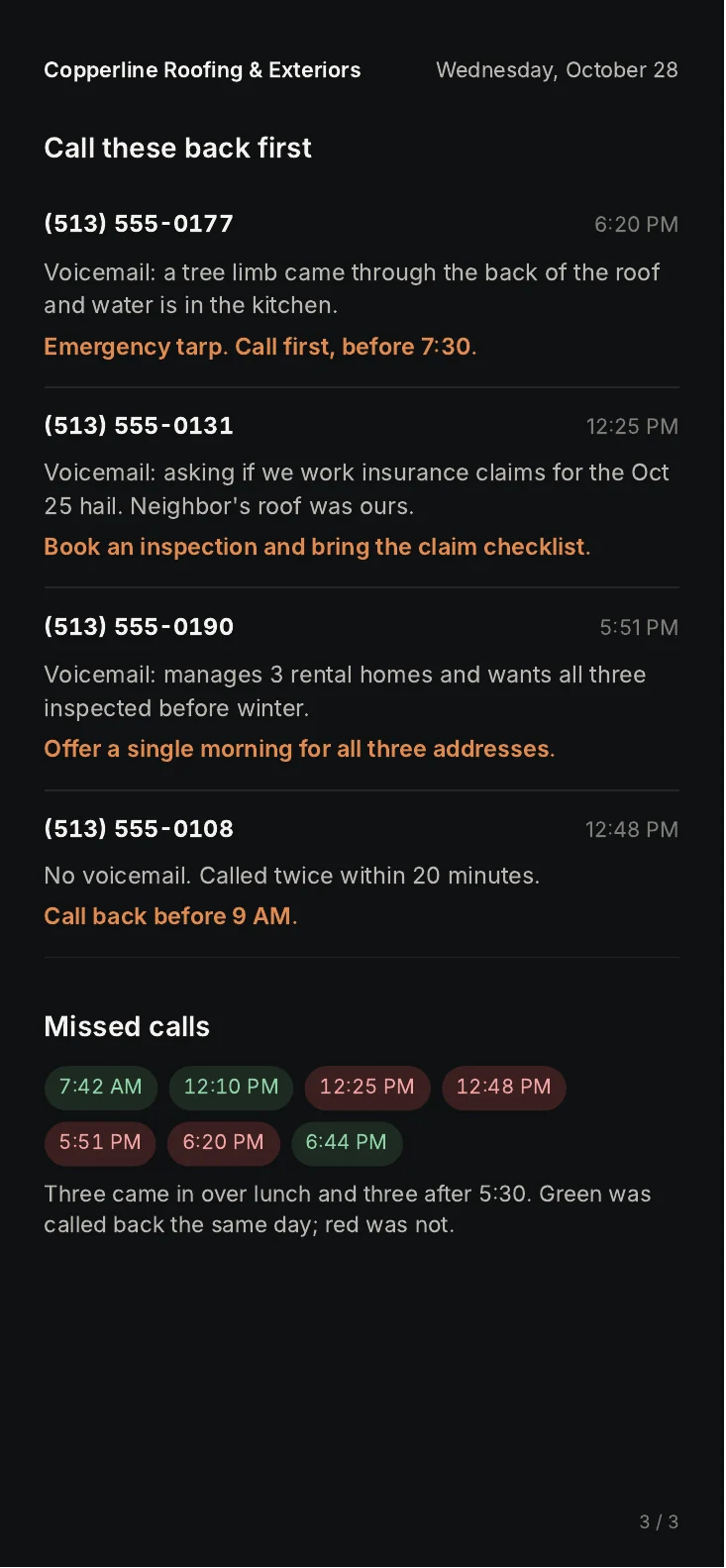
Each morning the report takes yesterday’s call log and lines it up against your sales system. A call from a number that belongs to a customer account gets that customer’s name. A call followed by an order, a quote or a signed contract gets the dollar amount. Then the report sorts everything into what a manager needs:
- calls taken, calls made and calls missed, by rep and by hour
- missed calls that were returned and missed calls that weren’t, with how long each caller has waited
- calls that turned into orders, with the amount
- quotes given on the phone that haven’t turned into orders yet
- callers who rang more than once without getting what they needed
If the phone system also makes transcripts, the report adds what each customer said. If it doesn’t, everything in the list above still works from the log alone.
Missed calls
Lining up a call log against orders often shows what missed calls cost. A caller who gets voicemail at lunch may call the next company on their list. In the sample review for a fictional freight brokerage, 11 of 27 missed calls came at noon or after 4 PM, and two of those callers named a load they then gave to another broker.
The daily page lists every missed call nobody has returned, in the order they should be called back, so somebody can work through them first thing.
Exporting your call log
Most phone systems let an admin export the call log as a CSV or Excel file for any date range. Look in the admin settings for a section called call history, call log, analytics or reports. Aircall, CallRail, Dialpad, JustCall, Nextiva, RingCentral, 8x8 and Zoom Phone all have one.
For a sample report we need one week. For the daily report we set up read-only access so nobody has to export anything again.
If you’d rather track calls yourself for now, our free sales call report template has the columns we’d start with.
Common questions
Can you work from a CSV export instead of a live connection?
Yes. A weekly export works if your phone system doesn’t allow read-only access. The daily report runs more smoothly with a live connection because nobody has to remember to export.
Do we need call recording turned on?
No. The call log alone gives calls, missed calls, callbacks and the orders that followed. Recordings and transcripts add what the customer said.
How far back can the report compare?
As far back as your call log and sales system go. The daily page compares each day with the day before, the same day last week and the same day last year.
What about calls made from personal cell phones?
The report only sees calls that go through your business phone system. Most business phone systems have a mobile app that logs calls made from a cell phone.
Get on the January list
Samples and orders open in January 2027. Email us with your company name and phone system, and we’ll put you on the list for the first free sample reports.
Join the January list